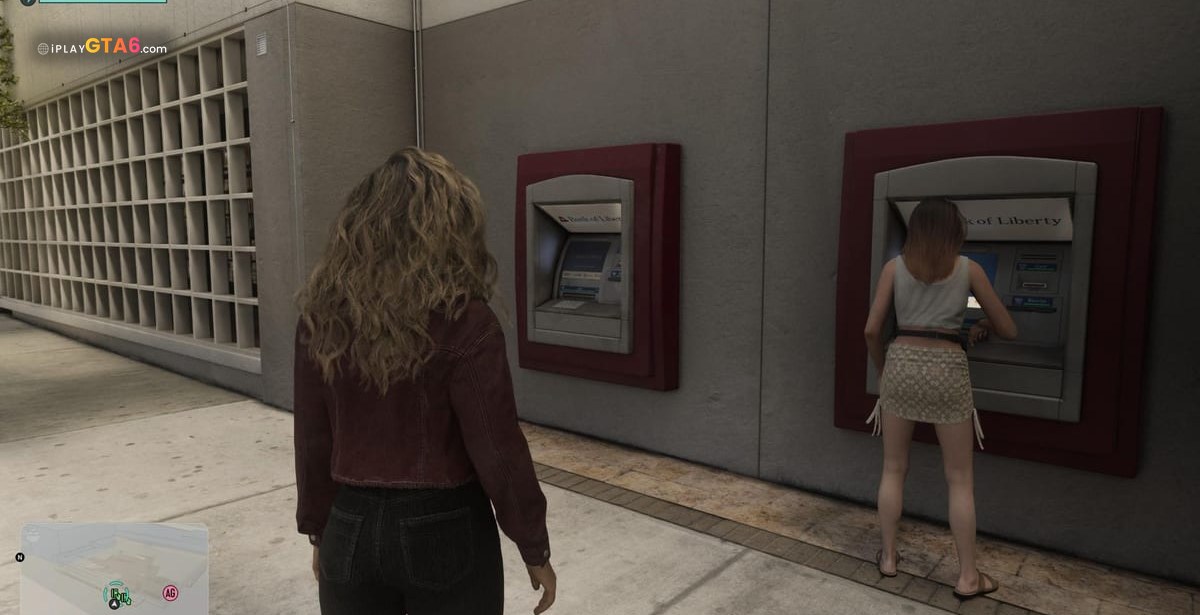
The top of your screen is dark in GTA 6, and it stays dark. Bright skies look dim, the corners close in, and no menu option says the word vignette anywhere. Players have spent launch week hunting for the switch. There is no vignette toggle in GTA 6, and Rockstar has said so directly.
That does not mean you are stuck with the worst version of it. The dark edges come from more than one effect, and the GTA 6 vignette can be reduced in practice by turning down the screen-edge sliders in the Display tab, by updating the game, and by taking off your character's sunglasses. This guide separates what Rockstar confirmed from what players only claim.
Can You Turn Off the GTA 6 Vignette?
No. Rockstar's Michael Kane, Vice President of Dynamic Art, told Wccftech that the vignette is an artistic choice and that the studio currently does not support any toggle for it. Digital Foundry reached the same conclusion from the menu side, saying at 9:47 in its tech review that GTA 6 uses a pretty heavy vignette at times which also cannot be altered.
Rockstar did say it recently identified and fixed an issue where the vignette was becoming stronger than intended in certain circumstances. The studio did not say which update carried that fix, and our patch 01.002.002 breakdown shows the November 23 patch notes do not mention the vignette. So updating the game removes only the bug that made the effect stronger than intended. The effect itself stays.
How to Reduce the GTA 6 Vignette With Display Settings
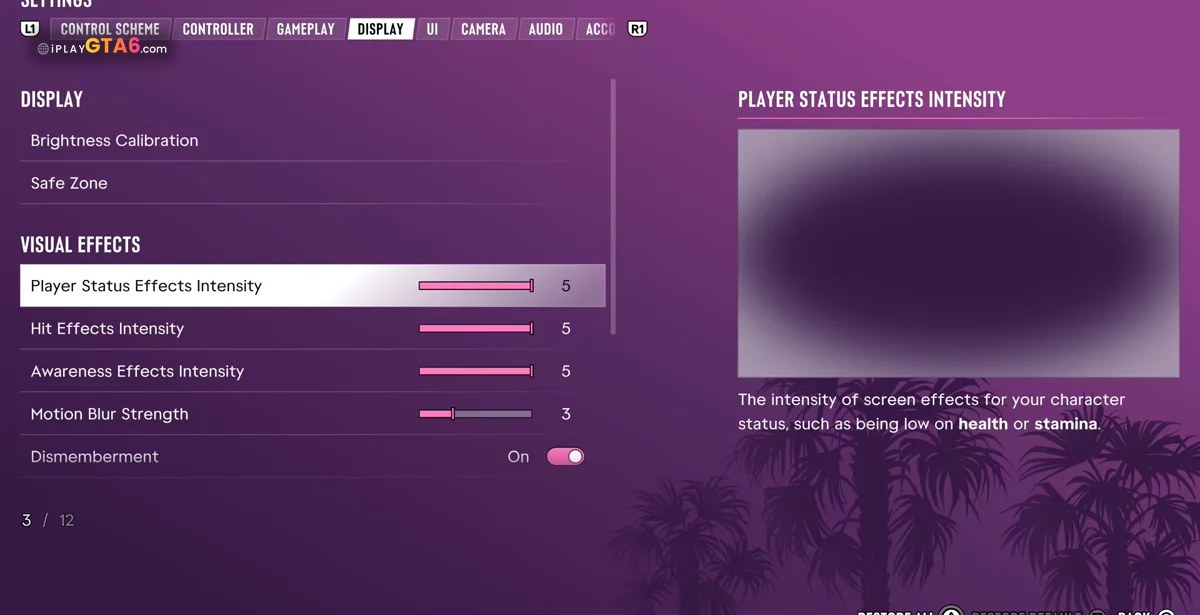
Here is where the guides disagree. One guide, HowToVideoGame, says turning Player Status Effects Intensity all the way down turns the vignette off in effect, because that slider clouds the edges of your screen when you are low on health or stamina, and its preview picture in the menu is exactly that vignette. Another checked source, GameBrief, tested that claim against Rockstar and the menu videos and marks it unverified, because no timestamped video shows the permanent vignette changing when the slider moves.
Both things can be true at once. The Display tab has three sliders that control screen-edge effects, and turning them down removes the edge effects that stack on top of the permanent vignette. What they do not do, as far as any checked source shows, is remove the artistic vignette itself.
Press Options to open the pause menu, then select Settings. The settings are split into tabs, and you move between them with R1 on PS5.
Press R1 until you reach the Display tab. It comes after Control Scheme, Controller and Gameplay, and it holds the Visual Effects sliders.
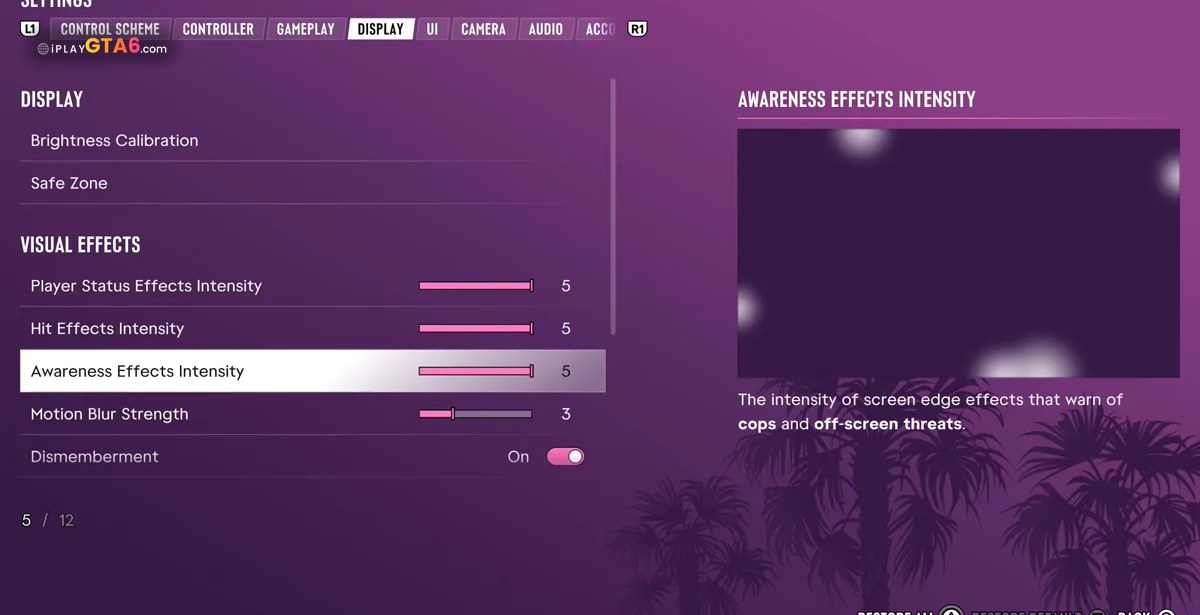
Highlight Player Status Effects Intensity, the first slider under the Visual Effects heading. The game describes it as the intensity of screen effects for your character status, such as being low on health or stamina. Slide it left to lower it. It started at 5, with the slider full.
Hit Effects Intensity sits right under it, and it controls screen edge hit effects, such as blood spatters, bullet whizz by, and armor hits. Turn this down if the edges flash or smear when you are shot at.
Awareness Effects Intensity controls the screen edge effects that warn of cops and off-screen threats. These glows tell you where trouble is coming from, so keep this one on. It is useful information rather than decoration.
If you want to put everything back, Restore All on Triangle returns the defaults. Our best settings guide walks through every tab.
What the Three Edge Sliders Actually Do
It helps to know which dark edge you are looking at, because each slider owns a different one. Player Status Effects is the clouded edge when you are low on health or stamina. Hit Effects is the flash and smear at the edges when you take fire. Awareness Effects is the glow that points toward cops and threats off screen.
| Slider | What it controls | Default |
|---|---|---|
| Player Status Effects Intensity | Screen effects for low health or stamina | 5 |
| Hit Effects Intensity | Edge effects from hits, blood and bullets | 5 |
| Awareness Effects Intensity | Edge glow warning of cops and threats | 5 |
The permanent vignette is none of these three. It is the dark band at the top of the screen, and sometimes at the bottom and sides, that comes and goes while you play. Taking off your character's sunglasses does not always remove it, though one guide found shades make it slightly stronger. The darkening is strongest along the top, where it makes bright skies look dim.
Other Display Options That Clean Up the Picture
While you are in the Display tab, Motion Blur Strength is worth a look. It started at 3 on a 0 to 10 slider, and setting it to 0 gives a sharper picture, which makes the dark edges less distracting even though it does not remove them.
There is no film grain, chromatic aberration, depth of field, or field of view slider. If a guide tells you to turn one of those off, it is describing settings that do not exist. Our accessibility settings guide covers the options that do exist for readability.
Tips That Do Not Work, Checked
A lot of vignette advice is wrong, and GameBrief checked each claim against Rockstar and the menu videos. A Reddit claim that a slider exists where you can turn the effect down was called incorrect and misinformation in the replies, and the idea that the vignette means Jason or Lucia is tired or hungry has no video or Rockstar page behind it. Updating the game helps only with the stronger-than-intended bug Rockstar described. Taking off sunglasses helps partly, since shades make it slightly stronger, but removing them does not remove it. There is no Performance Mode or Quality Mode either: GTA 6 targets 30 frames per second on every console, and no menu option changes that.
Quick Questions
Can you turn off the vignette in GTA 6?
No. Rockstar's Michael Kane told Wccftech the vignette is an artistic choice and there is currently no toggle for it. Rockstar fixed a bug that made it stronger than intended, but the effect stays.
Does lowering Player Status Effects Intensity remove the vignette?
It lowers the clouded screen edges you get when low on health or stamina. No checked source shows it removing the permanent vignette, so treat it as a cleanup step, not an off switch.
Why are the edges of my screen dark in GTA 6?
Usually the permanent vignette, strongest along the top. Low health, taking hits, and off-screen threats add their own edge effects on top of it.
Is there a vignette setting in GTA 6?
Not by that name. The Display tab's Visual Effects sliders control the screen-edge effects instead.
The vignette is staying put until Rockstar changes its mind. Turn the edge sliders down, take the sunglasses off, update the game, and the worst of the dark edges will calm down.